Vladimir Sarić wrote this on October 2, 2012
Using FastGettext to translate a Rails application
Ruby on Rails is shipped with i18n gem, which provides an internationalization and localization system. It basically allows the developer to abstract all the locale specific elements, mainly strings and date formats, out of the application.
The i18n gem is split into two parts: 1) the public API and 2) the default backend, intentionally named Simple.
As the Rails guide suggests, the Simple backend can be replaced, if needed, with a more powerful one. And that’s where FastGettext comes into play.
FastGettext
FastGettext is an implementation of Gettext for Ruby. It has many benefits over Gettext, primarily in performance and support for multiple backends:
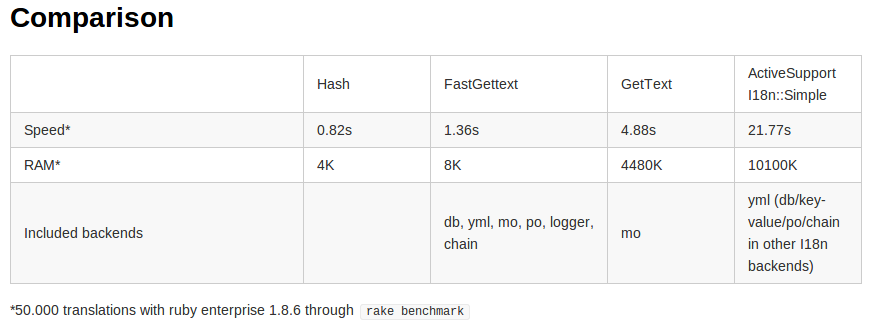
Since translations are cached after the first use, performance is almost the same for all the backends. Although we found that using the database as the backend offers the most flexible solution.
The great thing about FastGettext, If you are working Rails, is that is has a called gettexti8nrails for integrating it into the application.
Installation
If you plan on using the database as the backend, here’s how you can set it up:
1) Add the gettext_i18n_rails gem your Gemfile:
gem 'gettext_i18n_rails'
And of course run bundle install.
2) Initialize FastGettext by adding the following into config/initializers/fast_gettext.rb (adapt to your target locales):
require "fast_gettext/translation_repository/db"
FastGettext::TranslationRepository::Db.require_models
FastGettext.add_text_domain "app_name", :type => :db, :model => TranslationKey


FastGettext.default_available_locales = ["sr-Latn",”en”]
FastGettext.default_text_domain = 'app_name'
3) Set up the locale by adding the following to app/controllers/application_controller.rb:
helper_method :locale
before_filter :set_gettext_locale

protected

def locale
  default_locale = Rails.env.test? ? "en" : “sr-Latn”
  params[:locale] || session[:locale] || default_locale
end

private

def set_gettext_locale
  session[:locale] = I18n.locale = FastGettext.set_locale(locale)
  super
end
4) Add a CRUD interface for the translations. You can either use translationdbengine or roll your own. We decided to do the latter.
To roll your own interface, you first need to generate and run the following migration:
class CreateTranslationTables < ActiveRecord::Migration
  def self.up
    create_table :translation_keys do |t|
      t.string :key, :unique=>true, :null=>false
      t.timestamps
    end
    add_index :translation_keys, :key


    create_table :translation_texts do |t|
      t.text :text
      t.string :locale
      t.integer :translation_key_id, :null=>false
      t.timestamps
    end

    add_index :translation_texts, :translation_key_id
  end


  def self.down
    drop_table :translation_keys
    drop_table :translation_texts
  end
end
There’s no need to create the models, since they are in the gettexti8nrails gem, and the controller and views are pretty standard Rails REST.
For example, here’s our ‘index’ action:
def index
  @translation_keys = TranslationKey.all(:order => "created_at DESC")

  if params[:sort_by] == "name"
    @translation_keys.sort! { |a, b| a.key <=> b.key }
  end
end
Here’s a screenshot of our translation interface:

Translating
Translating text is a pretty straightforward process and the result doesn’t clutter up the code as one might expect. When translating copy which, for example contains links, it’s a bit more work but still simple.
One important thing to remember is to use “syntax.with.lots.of.dots” for keys, since it drastically increases the ability to find where the key is used.
For example, let’s translate a simple welcome page.
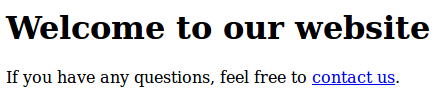
<h1><%= _("views.home.index.welcome") %></h1>

<p><%= (_("views.home.index.questions %{contact_link}") % {:contact_link => link_to(_(“views.home.index.contact_us”), home_contact_url)")}).html_safe} %></p>
Note that we had to mark contact copy as html safe.

Exporting and importing translations
Storing translations in the database is great, but in order to have them under version control they need to be in a file as well. For this purpose we created a rake task that exports them to a YAML file:
require 'ya2yaml'

namespace :app do
  namespace :i18n do

    desc "Dump translations from your db into config/translations.yml file."
    task :dump => :environment do
      translations = TranslationRepository.export

      File.open(Rails.root.join("config", "translations.yml"), "w") do |f|
        f.write(translations.ya2yaml)
      end

      puts "Wrote new translations into file. You may commit it now."
    end

  end
end
The TranslationRepository class loads and exports the translations as hashes:
class TranslationRepository

  def self.export
    locales = TranslationKey.available_locales
    translations = []

    TranslationKey.find_each do |key|
      locales.each do |locale|
        trans = TranslationKey.translation(key.key, locale)
        translations << {:key => key.key, :translation => trans, :locale => locale}
      end
    end

    translations
  end

  private

  def self.create_or_update_translation(key, translation, locale)
    translation_key = TranslationKey.find_or_create_by_key(key)
    translation_text = translation_key.translations.find_by_locale(locale)
    return TranslationText.create(:translation_key_id => translation_key.id, :locale => locale, :text => translation) if translation_text.nil?
    translation_text.update_attribute(:text, translation)
  end

end
Note that we are using the ya2yaml gem here, since we found it to be working better than the built-in ‘yaml’ with multiple Ruby versions. If you wish to do the same don’t forget to add it to your Gemfile.
Apart from being able to put the translations under version control, this allows us to import the translations into another database (i.e. production) in a simple and convenient way. For that purpose, we created another rake task:
namespace :app do
  namespace :i18n do
    desc "Load translations from config/translations.yml into your db."
    task :load => :environment do
      translations = YAML::load_file(Rails.root.join("config", "translations.yml"))
      TranslationRepository.load_translations(translations)
    end
    end
  end
end
class TranslationRepository

  def self.load_translations(translations)
    remove_existing_translations

    translations.each do |t|
      TranslationRepository.create_or_update_translation(t[:key], t[:translation], t[:locale])
    end
  end

  private

  def self.create_or_update_translation(key, translation, locale)
    translation_key = TranslationKey.find_or_create_by_key(key)
    translation_text = translation_key.translations.find_by_locale(locale)

    if translation_text.nil?
      return TranslationText.create(:translation_key_id => translation_key.id, :locale => locale, :text => translation)
    end

    translation_text.update_attribute(:text, translation)
  end

  def self.remove_existing_translations
    TranslationKey.destroy_all
    TranslationText.destroy_all
  end

end
The import code can, of course, be improved not to remove all the translation files and create new ones, but instead to check which translations are missing or need updating.
Issues
When using this method for translating a Rails application we encountered a few issues.
XSS / html_safe
As can be seen in the above example (translating a welcome page), when interpolating html elements you need to mark the translated strings as html safe, this is fine in some cases, but when you are the one that’s translating, or have a trusted translator, it’s just time better spent. gettexti18nrails documentation recommends a couple of solutions for this, but they did not work for us.
Date format translations
When loading date format translations from config/locales/en.yml we encountered an issue with date helpers like date_select.
The date helpers expect to get an array ([:year, :month, :day]) and date format translations are correctly stored in the YAML file, using the YAML array format:
---
- :year
- :month
- :day
But FastGettext was returning a string instead and we were getting an exception.
We managed to solve this with a monkey patch by detecting a YAML array (be sure to put something like this in an initializer):
class TranslationKey

  class << self
    alias_method :original_translation, :translation
  end

  def self.translation(key, locale)
    text = original_translation(key, locale)
    return text if text.nil?
    return YAML::load(text) if text.match /^---.*/ #detect YAML array via ---
    text
  end

end
Conclusion
FastGettext can of course do a lot more than outlined here. It’s very powerful and certainly a big improvement over i18n’s Simple backend, which isn’t meant to be a complete internationalization engine and that’s just fine.
FastGettext isn’t too complicated to set up, but with all the options it can be very daunting. It’s obvious that a lot of work has been done so far, but at the same time it deserves a lot more attention from the community. With this post we would like to help at least a little bit with that and also help others to get started.
It is, of course, possible that we made some mistakes and missed a few things, so if you spot anything please let us know. Also, we would love to hear your experiences with FastGettext and internationalization in Ruby and Rails in general.